Aim of script
Detect single trees from topographic models (DSM, DTM) derived from 3D point clouds.
General description
This script attempts to detect single trees in topographic models (-DSM and -DTM). To do so it calculates a local maxima map with a kernel based on the chosen crown sizes (-crownSizes) and kernel shape (-kernelShape) to find the positions of potential trees. The user defined minimum height corresponding to this crown size is then checked against the nDSM height values of potential trees. The nDSM (-nDSM) may optionally be provided to speed up processing. Finally you have the option to provide a echo ratio building mask (-er) to mask out buildings.
Parameter description
-DSM path to the DSM file
Type : Path
Remark : mandatory
-DTM path to the DTM file
Type : Path
Remark : mandatory
-nDSM path to the optional nDSM file
Type : Path
Remark : optional
Description: if no nDSM is provided it will be calculated
-erMask path to the optional echo ratio building mask
Type : Path
Remark : optional
-crownRadiuses list crown radiuses corresponding to minimum tree heights (in meter)
Type : Floating-point number
Remark : optional, default: (1.5, 2.5, 3.5)
-minHeights list of minimum tree heights corresponding to crown sizes (in meter)
Type : Floating-point number
Remark : optional, default: (3, 15, 25)
-kernelShape shape of the kernel - circle | square | diamond
Type : String
Remark : optional, default: circle
-resamplingMethod resampling method bilinear | bicubic | nearestNeighbour | simple average]
Type : String
Remark : optional, default: nearestNeighbour
-workingDir working directory
Type : PathArgument
Remark : optional, default: current directory
Description: working directory - All results will be stored here (folders will be generated)
-deleteTempFiles delete temporary files after processing.
Type : Boolean
Remark : optional, default: True
Description: If True, temporary files created during processing are afterwards deleted.
| possible input | evaluates to |
| 1, true, yes, Boolean(True), True | Boolean(True) |
| 0, false, no, Boolean(False), False | Boolean(False) |
Common Package/Script Options
Settings concerning the general options for (package) scripts.
-projectDir project directory
Type : Path
Remark : optional, default: current directory
Description: The default project directory is the current working directory, but can be easily changed by this parameter. All path parameters, if not specified as absolute paths, are interpreted relative to the project directory.
-outfile output file name (with extension) or output folder name
Type : Path
Remark : optional
Description: One can either provide a file name for the outfile (with extension) or provide a name for the output folder. In this case, the script estimates the outfile name, using the name of the provided DSM and adding "_detected_single_trees.tif"
-tempdir temporary directory
Type : Path
Remark : optional, default: _temp
Description: Specifies the directory where all intermediate results are stored. If not specified, a TEMP subdirectory is created in the current working directory. Additional subdirectories (one per involved module) are created.
-skipIfExists skip processing if result already exists
Type : Boolean
Remark : optional, default: True
Description: Skip processing if result already exists. In order to re-run current script it is useful to repeat the processing only if the respective output does not already exist. This allows for incremental processing of large projects.
| possible input | evaluates to |
| 1, true, yes, Boolean(True), True | Boolean(True) |
| 0, false, no, Boolean(False), False | Boolean(False) |
Logging Options
Settings concerning the verbosity level of logging.
-fileLogLevel Log level in the logfile
Type : LogLevel
Remark : optional, default: info
-screenLogLevel Log level on screen
Type : LogLevel
Remark : optional, default: info
-logger Logger
Type : Logger
Remark : optional
Description: Logger is usually provided by the opals framework.The user may provide their own logger object, but it has to function in the same way as the opals Logger.
Examples
The data used in the following examples can be found in the $OPALS_ROOT/demo/forDelineation directory.
Example 1
This example shows the use of the forTreeDetection script with default parameters.
forTreeDetection -DSM forDelineation\DSM\DSM.tif -dtm forDelineation\DTM\DTM.tif
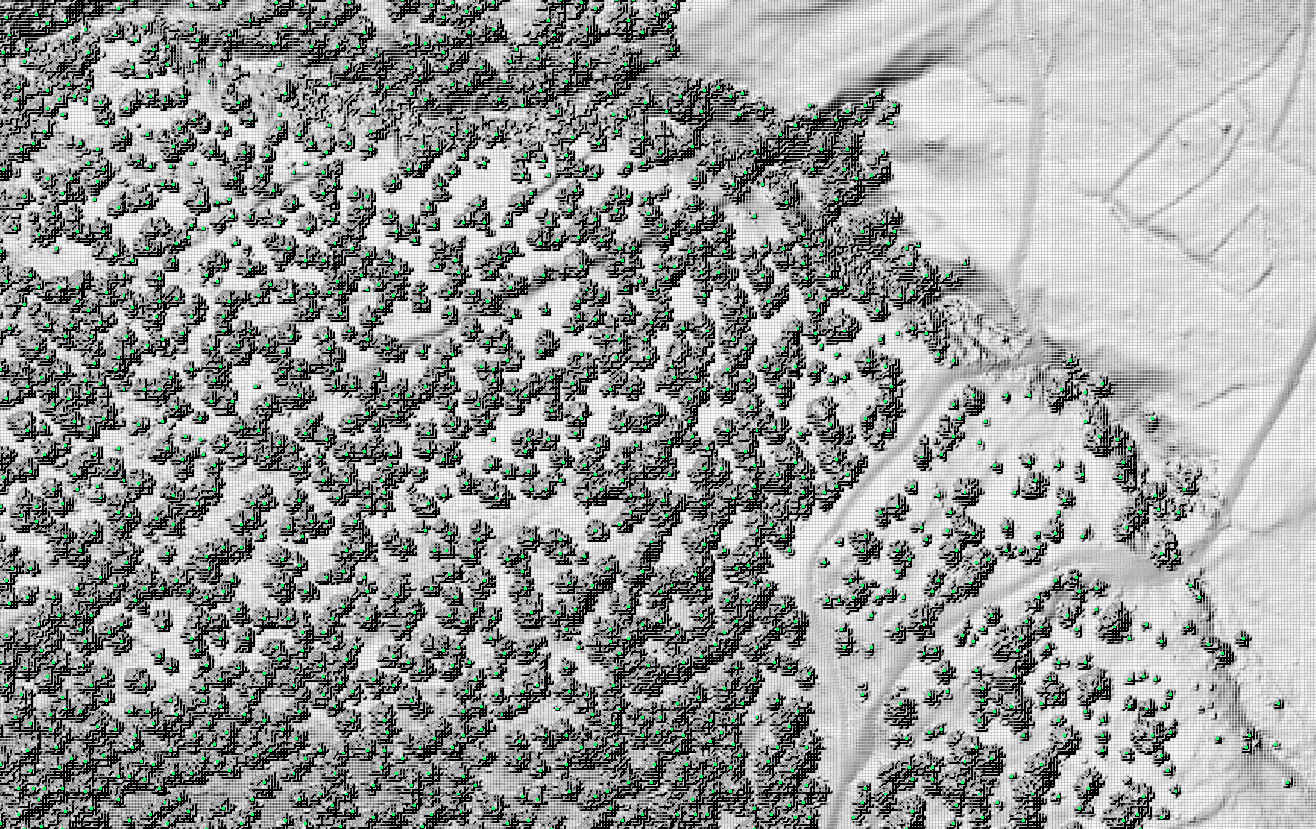
Figure 1: Each green point represents a detected tree; hillshaded DSM in background for reference
Example 2
This example shows the use of the forTreeDetection script with some optional parameters set.
forTreeDetection -DSM forDelineation\DSM\DSM.tif -dtm forDelineation\DTM\DTM.tif -crownRadiuses 2 3 4 5 -minHeights 2 10 20 40 -kernelShape
square -outfile single_trees.tif



 1.8.17