Table of Contents
This page presents exemplary ways how to beneficially use the Python bindings of opals modules, partly in combination with other Python extensions. As a prerequisite, a basic understanding of the Python language and its standard library are necessary - otherwise reading Python in a minute is recommended. For instructions on how to debug Python code, see Debugging OPALS Python scripts.
Introduction
Aiming at fulfilling the needs of different users, every opals module is provided with 3 bindings:
- executables,
- shared libraries, and
- Python modules.
While executables do not depend on any third-party software and may be run instantly, shared libraries offer the possibility for a tight integration into other software, but require compilation. As a drawback, usage of Python modules requires the availability of a Python interpreter. However, OPALS comes with an internal Python installation, and users may enjoy the rich set of language features and the typed, in-memory communication provided by Python bindings in contrast to the limited options available with executables, and the ease of a high-level, interpreted language as opposed to the need for compilation when using shared libraries.
Python (named after the BBC show Monty Python's Flying Circus) features outstanding characteristics, among which the following may be most important:
- Python is an interpreted language, allowing for rapid prototyping,
- can be run interactively,
- comes with built-in, high-level data structures,
- supports object-oriented programming with classes and multiple inheritance,
- is at the same time dynamically and strongly typed, allowing for compact code that is easy to read, while still providing concise error messages via exceptions,
- uses automatic memory management,
- may be extended by modules implemented in other programming languages, e.g. allowing for expensive computations to be carried out in a compiled language (as done in OPALS modules),
- may be embedded into other software (as done in OPALS),
- runs on many platforms and operating systems, and
- may be used, modified, included in (commercial) software and re-distributed free of charge.
This page aims at highlighting the benefits of using the Python bindings of OPALS modules. As a prerequisite, a one-minute-introduction to the Python language and its standard library are given in Python in a minute.
Working with OPALS modules
Parameter access
The Python bindings of OPALS modules reflect closely their C++ - counterparts: every OPALS Python module is derived from opals::IModuleBase's equivalent on the Python side ("opals.Base.Base"), which comes with all common parameters and global parameters (see Parameter Categories). Every module parameter can be accessed as a Python property:
Parameters as properties
Please note that the get_<parameterName>, set_<parameterName> and isSet_<parameterName> methods have been deprecated and removed in the builds following Sept. 25th, 2016.
Data type mapping
All data types exposed by OPALS modules are mapped to a certain Python data type. Mostly, this mapping is clear: e.g. C's int is mapped to Python's int, opals::String is mapped to Python's str, and opals::List are mapped to Python's list. For each enumeration, a custom data type is exposed on the Python-side, with constants for each enumerator.
Not obvious is the mapping of C++ types that have no "natural" correspondence on the Python side. For some, but not all of these types, OPALS defines a custom data type on the Python side (e.g. opals::HistoStats), whose methods are thus accessible to the Python interpreter. C++'s std::pair, opals::Vector, and opals::Array are all mapped to Python's list. opals::Matrix, respectively, is mapped to a Python list of Python lists (which is easily converted to a numpy.matrix). Those types, for whom no special Python equivalent is defined, are represented as str in Python. Whether such a special type is defined, may be determined by usage of help.
Examples
In the following, two examples are presented that closely follow the ones presented in the example-sections for modules Module Bounds and Module Histo. As extensions to these examples that are conducted with OPALS modules only, simple visualizations are created here, using third-party modules. Kindly note that all needed third-party modules are included in the OPALS Python AddOns.
Strip overview
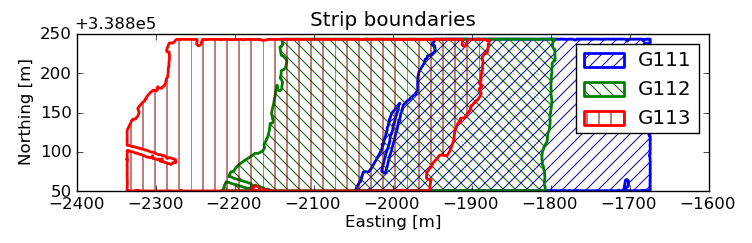
In this example, Module Import and Module Bounds are used to determine a tight outline of the 3 data sets G111.las, G112.las, and G113.las found in the OPALS demo-directory. Using these outlines, a combined plot is created using the Python module matplotlib, which provides basic 2D plotting functions. Package os comes with Python and provides basic operating system functionalities. Its sub-module path facilitates file path operations. As Module Bounds does not grant in-memory access to the resulting outline, but exports vector data files, these must be read in here. We choose the simple text-format 'xyz' as export format, which stores the 3 coordinates of a point on each line, separated by white space. As Module Bounds exports a single, closed polyline, the topology is unambiguous. Module csv serves for reading in the xyz-file. The final result looks like this:
Augmented histogram
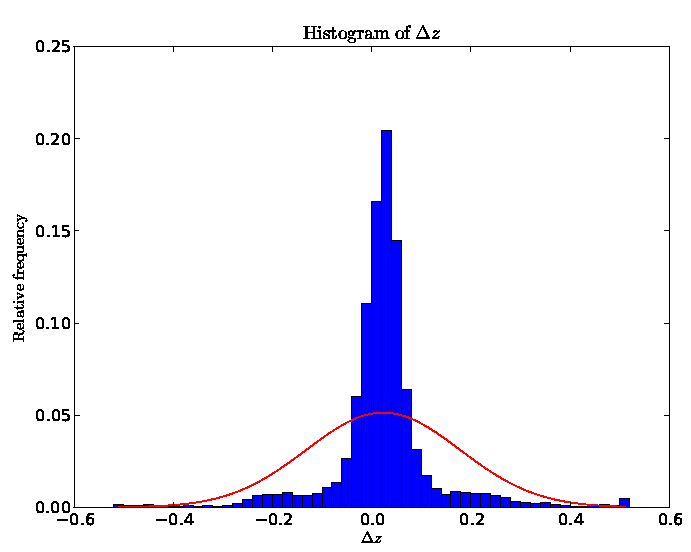
In this example, Module Import, Module Grid, Module Diff, Module Algebra, and Module Histo are used to generate a histogram of differences in height within the overlapping region of the 2 data sets strip19.las, and strip20.las found in the OPALS demo-directory. These overlapping regions are further restricted to smooth areas surrounded by point samples in every direction. For further details, see the respective example for Module Histo. As the OPALS-type opals::HistoStats exposes its data members to Python, the results are directly accessible in-memory. In addition to plotting the histogram itself, we overlay the normal probability density derived from the mean and standard deviation, as generated by Module Histo. The final result looks like this:
Working with OPALS package scripts
OPALS packages are found in $OPALS_ROOT/packages/python.
- Date
- 09.11.2011
