- See also
- python.workflows.preCutting
Aim of module
Cuts an ODM/Raster file using one or more polygons of a shape file.
General description
In order to process them correctly, the polygons within the shapefile have to be non self-intersecting and must not have holes.
ATTENTION! In case of RASTER data, please make sure to handle the resampling and the rounding right. In case that the values should stay constant in resampling (e.g. Classification, Integer-values), nearestNeighbour resampling has to be used. For other applications (Height models etc.), bilinear and bicubic resampling modes are more suitable. Some raster properties and the resampling mode can lead to half-pixel offsets in the results! To avoid them, the rounding mode (-c) can be switched between center and corner.
- See also
- Script documentation
Parameter description
-buffer Buffering distance around the polygon in meters.
Type : Floating-point number
Remark : optional, default: 0
Exporting Options
Settings concerning type and location of the resulting files.
-export [path]\[prefix of filename].[extension]
Type : Path
Remark : optional
Description: Define the [path]\[prefix of filename].[extension] - any of the three may be left out. For example: -export U:\results\polygons\cut\myPrefix.jpg
-oformat GDAL driver for raster, file format or XML file for Vector.
Type : String
Remark : optional
-skipIfExists Skip processing if result already exists.
Type : Boolean
Remark : optional, default: True
| possible input | evaluates to |
| 1, true, yes, Boolean(True), True | Boolean(True) |
| 0, false, no, Boolean(False), False | Boolean(False) |
-writeEmptyTiles if True also empty tile files are created
Type : Boolean
Remark : optional, default: False
| possible input | evaluates to |
| 1, true, yes, Boolean(True), True | Boolean(True) |
| 0, false, no, Boolean(False), False | Boolean(False) |
-odmTileSize Optional odm tiles size when exporting odm files. If not set, the automatic odm tile size estimation is used
Type : Floating-point number
Remark : optional
-singleFilePerTile One input file per output tile
Type : Boolean
Remark : optional, default: False
Description: If set to True only one input file is used for creating the output tile (based on the shortest distance between center points of the input files)
| possible input | evaluates to |
| 1, true, yes, Boolean(True), True | Boolean(True) |
| 0, false, no, Boolean(False), False | Boolean(False) |
-distribute determine how many local processes should be used
Type : String
Remark : optional
Description: according to the number chosen as the value, independent processes are being started to parallelise (parts of) the program and therefore enhance the runtime.
-generateOverviews if True, overview matrices for a stricter overlap test are generated.
Type : Boolean
Remark : optional, default: True
Description: Controls, whether or not
opalsInfo creates the overview matrices for inputshape Files. If they are already created by the user beforehand, the script will still check for strict overlaps.
| possible input | evaluates to |
| 1, true, yes, Boolean(True), True | Boolean(True) |
| 0, false, no, Boolean(False), False | Boolean(False) |
Input data Options
Settings concerning type an location of the input data.
-vector Path(s) to the vector file(s)
Type : Path
Remark : optional
Description: Path where the vector files to cut are located [mandatory if no rasterpath is specified]. At the moment only ODM files are supported. For example -vector U:\Tiles\*.tif -vector U:\OtherTiles\ -vector U:\Folder\poly*.tif
-raster Path(s) to the raster file(s)
Type : Path
Remark : optional
Description: Path where the raster files to cut are located [mandatory if no vectorpath is specified]. For example -raster U:\Tiles\*.tif -raster U:\OtherTiles\ -raster U:\Folder\poly*.tif
Raster cutting Options
Settings concerning the processing of raster data.
-truePolygons Use true polygon or rectangular bounding box
Type : Boolean
Remark : optional, default: False
Description: By default, only the polygon bounding box of rasters is cut out. With this option, it is possible to cut out the true polygon shape. Since the process is more time consuming, it should only be chosen for non-rectangular polygons.
| possible input | evaluates to |
| 1, true, yes, Boolean(True), True | Boolean(True) |
| 0, false, no, Boolean(False), False | Boolean(False) |
Type : String
Remark : optional, default: mean(r)
-resamplingMethod OpalsGrid resampling method [bilinear | bicubic | nearestNeighbour]
Type : String
Remark : optional, default: bilinear
-roundingMethod Method to round the results to exakt pixel positions [corner | center]
Type : String
Remark : optional, default: corner
Polygon Shape file Options
Settings concerning the polygons to cut out.
-shapefile Shape file containing the polygons used as cutting limits.
Type : Path
Remark : mandatory
-attribute Name of the Shape file attribute that will be part of the export filename.
Type : String
Remark : optional, default: id
-pickpoly Choice of the target polygon(s) if not all polygon(s) shall be cut.
Type : String
Remark : optional
Logging Options
Settings concerning the verbosity level of logging.
-fileLogLevel Log level in the logfile
Type : LogLevel
Remark : optional, default: info
-screenLogLevel Log level on screen
Type : LogLevel
Remark : optional, default: info
-logger Logger
Type : Logger
Remark : optional
Description: Logger is usually provided by the opals framework.The user may provide their own logger object, but it has to function in the same way as the opals Logger.
Examples
As a prerequisite for the subsequent examples, please import the data using the following commands:
Example 1
This example uses preTiling to create a shapefile with tiles and then cuts the odm according to the tiles.
preTiling -
vector G111.odm -tilesize 300 -skip False
preCutting -
vector G111.odm -shapefile Tiles.shp -export G111_tile -skip False
Example 2
This example loads the three input files using a wildcard and then again first creates a tiling and cuts according to it.
preTiling -
vector G11*.odm -tilesize 300 -skip False
preCutting -
vector G11*.odm -shapefile Tiles.shp -export
tile -skip False
Example 3
preCutting also supports las-files as input.
preTiling -
vector G111.las -tilesize 300 -skip False
preCutting -
vector G111.las -shapefile Tiles.shp -export G111_tile -skip False -buffer 10
Example 4
preCutting also supports a mix of odm and las-files as input.
preTiling -
vector G111.las G112.odm -tilesize 300 -skip False
preCutting -
vector G111.las G112.odm -shapefile Tiles.shp -export
tile -skip False -buffer 10
Example 5: .txt input and filterlist
It is also possible to use filterstrings to set attributes or to filter the input data via the use of generic filters. The .txt file inputlist.txt (can be found in the demo directory) contains the following lines of code, providing the input files as well as additional information and filtering.
"strip11.laz" "generic[_year(uint16)=2018;_month(uint8)=4;_day(uint8)=10] and generic[z > 275 and z < 280]"
"strip12.laz" "generic[_year(uint16)=2018;_month(uint8)=4;_day(uint8)=10] and generic[z > 275 and z < 280]"
"strip21.laz" "generic[_year(uint16)=2018;_month(uint8)=4;_day(uint8)=10] and generic[z > 275 and z < 280]"
"strip22.laz" "generic[_year(uint16)=2018;_month(uint8)=4;_day(uint8)=10] and generic[z > 275 and z < 280]"
"strip31.laz" "generic[_year(uint16)=2018;_month(uint8)=4;_day(uint8)=10] and generic[z > 275 and z < 280]"
"strip32.laz" "generic[_year(uint16)=2018;_month(uint8)=4;_day(uint8)=10] and generic[z > 275 and z < 280]"
The information that each strip was recorded on April 10th 2018 should be passed down to the resulting cutted odms and stored in the custom attributes _year, _month and _day. The second part of the filter is set to only use points between 275m and 280m of height (i.e. the z-coordinate). We can use the following lines of code to now cut these tiles.
preTiling -
vector strip*.laz -export stripTiling.shp -tileSize 100
preCutting -
vector inputlist.txt -export
tile -shapefile stripTiling.shp -skip False -distribute 4
As we can see in Figure 1 (highlighted at the top) the resulting odm only has points within our specified range of 5m. Additionally (highlighted in the middle) we can see the three new attributes that were added.
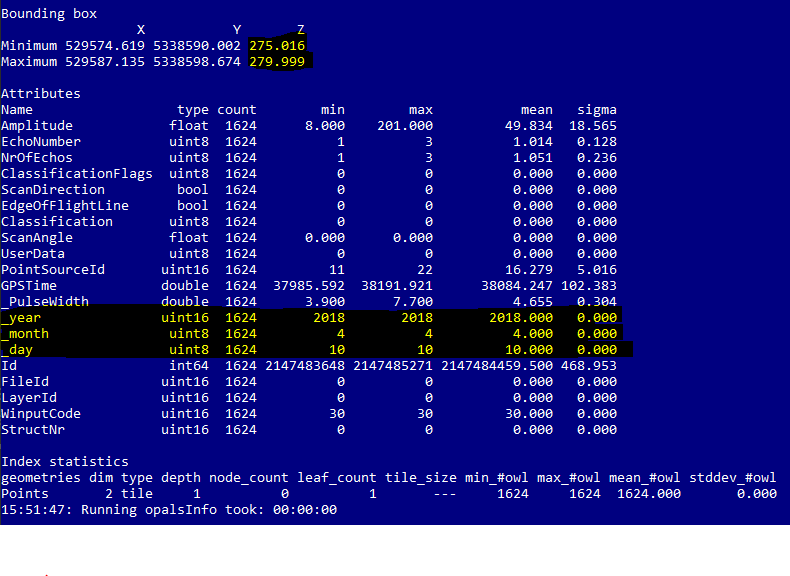
Figure 1: opalsInfo on one of the resulting tiles highlighting the added information as well as the effect of the filtering of the data.



 1.8.17