

Technische Universität Wien
Orientation and Processing of Airborne Laser Scanning data
Department of Geodesy and Geoinformation - Research Groups Photogrammetry and Remote Sensing

OPALS can be used to extract human-built structures from a point cloud. This use case example demonstrates the extraction of gable roofs and their ridges. The script uses the Module Segmentation in order to extract planes from the given point cloud. Then adjacent roof planes are detected and intersected to derive the final gable roof and its ridge line segment.
As described above, the algorithm first derives planar segments from the point cloud and computes bounding boxes for each of these planes. To identify neighbouring planes, it searches for intersecting bounding boxes. For each group of neighbouring planes, the algorithm evaluates whether the planes have similar inclination, opposite orientation, and matching height. These criteria eliminate most segments that do not form a gable roof. In cases where multiple candidates remain, the neighbouring segment with the largest number of points is selected. This criterion is effective because smaller substructures on roofs like dormers or chimneys will be ignored.
The script continues with intersecting detected gable roof segment pairs, resulting in a roof ridge line. To avoid numerical problems or large coordinate values the intersection is done by reducing the plane parameters to the center of gravity of one of the two segments. To represent the line as an appropriate line segment, the alpha shape of both segments are projected onto the computed ridge line. The extreme values of these projections are then used to end points of the ridge line segment.
The results of this algorithm can be easily transformed into building models, a first step of automatically deriving large scale city models. Nevertheless this strategy has some obvious limitations: Roof types other than gable roofs (like flat or monopitch roofs) cannot be identified. This means that the script is producing an incomplete set of roofs, but there are also structures classified as gable roofs in the derived model that are not actual roofs. As seen in Example Results, there are still some structures detected as roofs inside other roofs, which can easily be identified as artifacts when manually checking the results. Depending on the further use of the derived model, this might cause problems.
Since start and end point of ridge line is only derived from the alpha shapes of the segments, the length of the segment is typically not as accurate as height and position. Using additional wall segments precision of the end points can be improved.
In the section Algorithmic Script Details, the individual processing steps will be explained in more detail. The whole script can be found in the examples section.
| possible input | evaluates to |
|---|---|
| 1, true, yes, Boolean(True), True | Boolean(True) |
| 0, false, no, Boolean(False), False | Boolean(False) |
| all |
| iterative |
| show |
| save |
| both |
The first part of the script uses the Segmentation module in order to find planes that may later be connected to form gable roofs. For the Segmentation module, we use similar parameters to the ones in Segmentation Example 5. Similar to this example, we use the planeExtraction-mode of this module, which looks for planar surfaces inside the point cloud using normal vectors. This is why the Normals module must be run prior to the Segmentation module.
For each segment, two objects are saved in the '{args.outFile}_segments.odm' file: The bounding box, consisting of two polylines representing the lower and upper surface plane, and the alpha shape, in the form of a 3D Polyline. Both are saved with a variety of attributes (whether they are an alpha shape or not in the _AlphaShape variable, their center of gravity, normal vector, etc.), especially the attributes of the bounding boxes will be useful later. In order to access these attributes, a layout must be created. To finish up this part, the script loads the generated .odm-file (a command needed in order to have access to it) as well as the Polyline index, which will be needed for further processing.
The next step is to create a list of pairs that each form a gable roof pair. To achieve this, the script first identifies which boxes intersect each other. Therefore, the function pi.searchGeometry derives all bounding boxes that intersect with a given search window. As search windows, the script uses the bounding boxes of the individual segments, which are expanded by the searchExpand parameter in all directions, in order to be sure to find all neighbours.
Afterwards, the script uses the function check_gable_roofs_normals in order to filter out neighbours which are not relevant in forming a gable roof. If more than one potential partners remains, the decinding criterion is the number of points making up the bounding box, as explained in the Introduction to a Gable Roof Extraction Script.
The function check_gable_roofs_normals uses three criteria with corresponding thresholds, which can be adjusted according to data quality and inaccuracies in the processed dataset. The criteria check whether orientation is opposite while having the same inclination as well as kicking out all pairs above a maximum height difference in the center of gravity. The first two criteria are needed for the sheer definition of gable roofs, the third one is helpful in eliminating artefacts.
Going forward, it is necessary to collect the geometry of the bounding boxes as well as the points of which the alpha shapes consist for each segment. Since the alpha shapes are needed for defining a box that limits the ridge line later on, it is sufficient to save them in a dictionary in which the value for each key (the corresponding Segment ID) consists of three lists (x-values, y-values and z-values). The z-values are not needed in this script, but are still saved in case of possible adaptations that might require limitations on the z-axis.
With all the data collected, the computation of the ridge lines, as explained in Extraction Algorithm and its Limitations is possible. The function compute_ridge_line intersects planes approximating the alpha shape using the centers of gravity as fixed points and the normal vector of the alpha shape. The projection_point_to_line function simply implements the mathematical framework of point projection. Both were defined manually beforehand.
Finally, the resulting ridge lines are saved in the ridge_lines list and can be visualized.
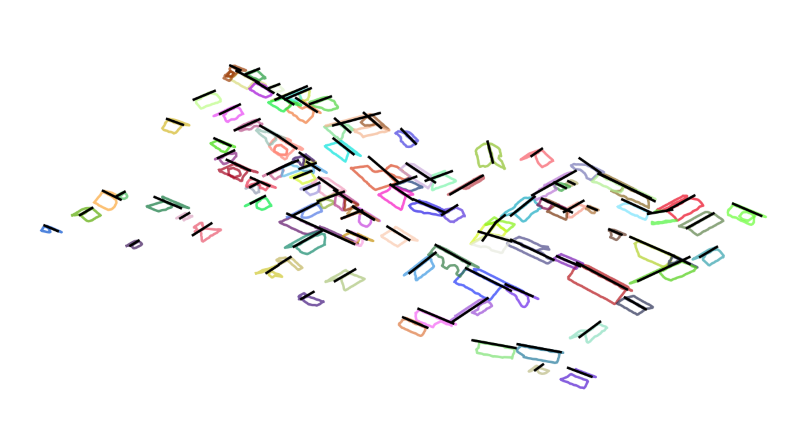
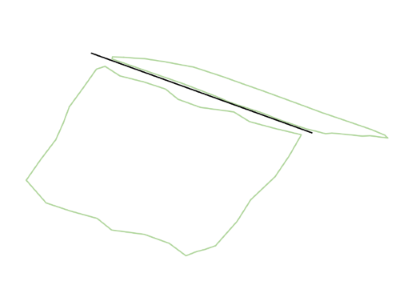
Using matplotlib, a view of all gable roofs can be created, as well as an iterative display of the individual roofs. This is shown in the following for the strip11.laz data set available in $OPALS_ROOT/demo/ directory.
The view of all roofs, as seen in Figure 1, can be created by calling (remove option outputMode save to get a matplotlib visualisation window):
The iterative display can be created with the following call:
One example of the output images is shown in Figure 2:
 1.8.17