

Technische Universität Wien
Orientation and Processing of Airborne Laser Scanning data
Department of Geodesy and Geoinformation - Research Groups Photogrammetry and Remote Sensing

Analyses a set of labelled point cloud tiles and sets up a new SPT project directory. Running clfSPTSetup is the mandatory first step in the training workflow before proceeding with clfSPTPreprocess and clfSPTTrain.
This script serves as the entry point for the SPT training workflow. Its primary job is to generate the necessary configuration files and directory structure required by the downstream tools. To do this, it scans the point cloud files (supporting all formats handled by pyDM.Import) to determine their semantic class distributions and check which point attributes are available for model training. Based on the class distributions, it creates either a stratified or random train/validation/test split and organises everything into a clean project structure containing <project>.cfg and <project>_config.py. For adjusting the dataset splits it is not necessary to re-run the script, it is also possible to move files between the split folders manually.
The Superpoint Transformer model expects labels within the range \([0, C]\), where \([C - 1]\) represents the total number of valid classes, with \(C\) reserved as IGNORE_LABEL. clfSPTSetup reads standard ASPRS classification codes from the input files and builds a remapping template (ID2TRAINID) inside <project>_config.py.
The classification attribute is strictly required, tiles missing this attribute are skipped with a warning and won't contribute to the project setup.
For every distinct value found in the classification attribute, the script maps it against the standard ASPRS LAS 1.4 codes (0 - 18). Any unknown IDs are given the name Class_<ID>. By default, four standard IDs are excluded because they usually represent noise or unlabelled points rather than actual semantic objects:
| ASPRS Code | 0 | 1 | 7 | 18 |
|---|---|---|---|---|
| Description | Never classified | Unclassified | Low point / noise | High noise |
Once the initial scan is done, an interactive table is shown, displaying the detected classes, their point shares, and their status. It is possible to rename classes and remap them to other IDs:
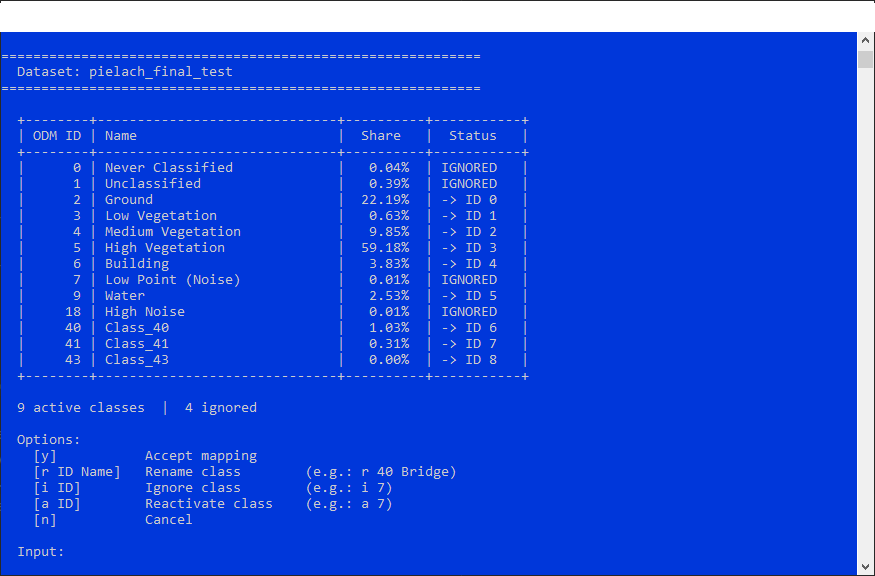
The final mapping translates source codes into contiguous, zero-indexed IDs which becomes the single source of truth for the entire project (ID2TRAINID in <project>_config.py).
Point features fall into two groups, depending on whether they are already present in raw point clouds or need to be derived beforehand with a dedicated OPALS module:
Usually available are Amplitude (intensity), Red/Green/Blue, NrOfEchos, and Reflectance. clfSPTSetup picks these up automatically if present.
Geometric features like linearity, planarity, scattering, verticality, and elevation are processed internally from the local point neighbourhood as part of the model's own partitioning pipeline. The elevation attribute, however, can be derived from a dedicated DTM created by OPALS (see clfSPTPreprocess and AddInfo for more information).
Before starting the whole training workflow, it is worth considering deriving some attributes beforehand with dedicated OPALS modules. The model currently supports NormalX/Y/Z - Module Normals and EchoRatio - Module EchoRatio.
The default train/val/test ratio of 70/15/15 follows common machine learning conventions, alongside alternatives like 80/10/10. There is no universal optimum, as the split ratio depends heavily on the dataset size and point distribution.
For ALS datasets and spatial data in general, two key factors make it beneficial to assign slightly more weight to the validation split than to the test split:
Because of this, a ratio such as 70/20/10 (prioritising the validation over the test set) is often preferable, especially for datasets with higher morphological and structural variability. Regardless of the chosen ratios, always review the per-split class distribution printed at the end of the run.
clfSPTSetup sets up the main folder structure under projectDir:
The input files are copied into their respective split folders and two key files are generated:
voxel size, learning rate, batch size, nr. of epochs, etc.), along with the detected feature dimensions. The model parameter (spt-2 or spt-3) selects the number of hierarchical partition levels used throughout the pipeline. The partition parameters pcp_regularization, pcp_spatial_weight and pcp_cutoff are automatically trimmed to match it when the .cfg is loaded, so preprocessing only builds as many partition levels as the model will actually use. Changing model after preprocessing requires re-running clfSPTPreprocess.Both files can be edited before running clfSPTPreprocess.
| stratified |
| random |
| possible input | evaluates to |
|---|---|
| 1, true, yes, Boolean(True), True | Boolean(True) |
| 0, false, no, Boolean(False), False | Boolean(False) |
A Setup call distributes tiles into train/val/test splits and generates the project configuration:
During Setup, the user is prompted to map the raw Classification attribute values (typically ASPRS codes) to semantic class names. This dialog can be used to merge classes (e.g. Low/Medium/High Vegetation -> Vegetation) or remove rare classes.
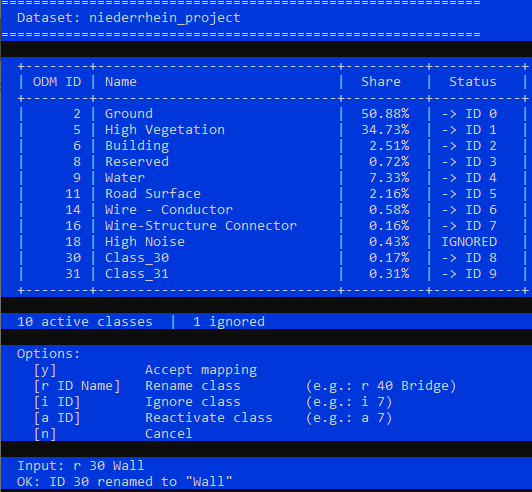 Fig. 1 Class renaming dialog | 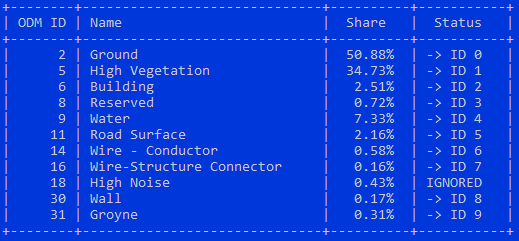 Fig. 2 Resulting class mapping |
The mapping is stored in configs/{datasetName}_config.py and controls num_classes for the entire pipeline.
 1.8.17