

Technische Universität Wien
Orientation and Processing of Airborne Laser Scanning data
Department of Geodesy and Geoinformation - Research Groups Photogrammetry and Remote Sensing

Trains a Superpoint Transformer model for semantic segmentation.
See script documentation for more details
clfSPTTrain expects a project directory previously set up with clfSPTSetup and preprocessed with clfSPTPreprocess. It reads the .cfg file from the project's configs/ folder and launches a full training run using PyTorch Lightning. The resulting directory is written to <project>/runs/train/<timestamp>/ and contains everything for inference. If no preprocessed .h5 cache exists when training starts, the DataModule automatically triggers the full pre_transform pipeline before the first epoch. This means that clfSPTPreprocess is technically optional for training. Omitting it simply moves the preprocessing cost into the training run. However, running clfSPTPreprocess separately is strongly recommended because it allows inspecting partition quality with the preview mode.
Run/ folder structure:
The config.yaml is the frozen Hydra configuration saved at the start of the training. It captures every parameter that shaped the model, including the complete pre_transform parameters used during preprocessing. clfSPTInfer and clfSPTPreprocess (mode=infer) load this file directly, ensuring that the same data pipeline is applied at inference time. The dataset_config.py is a copy of the project's <project>_config.py, making the run directory a self-contained, portable model that can be shipped to another machine without requiring the original project directory.
After training, the module runs an evaluation on the test split using the best checkpoint selected with metrics derived from the validation split during training. The test confusion matrix is exported as both a CSV file and a heatmap image for visual inspection.
To manage complex deep learning setups, SPT relies on Hydra, an open-source configuration framework developed by Meta. Hydra allows hierarchical configuration files (YAML) to be dynamically combined and overridden from the command line using dot-notation (e.g., model.optimizer.lr=0.01).
All training parameters specified in the project's .cfg file are converted into such Hydra overrides and merged with the SPT base architecture files. Key parameter groups include:
| Group | Parameter (.cfg) | Hydra Target (for -sweep) | Description / Effect |
|---|---|---|---|
| Partitioning | voxel, knn, pcp_regularization, pcp_cutoff | datamodule.voxel, datamodule.knn, ... | Controls point reduction and superpoint segmentation via clfSPTPreprocess. |
| Model | model | not sweepable via -sweep | Model backbone variant (spt-2 for 2-level hierarchy, spt-3 for wider 3-level spatial context). Unlike the other parameters, model selects an entire Hydra config group (model=semantic/spt-2.yaml vs. model=semantic/spt-3.yaml) rather than overriding a single leaf value, so it cannot be varied as a -sweep axis. |
| Optimization | lr, weight_decay, batch_size | model.optimizer.lr, model.optimizer.weight_decay, datamodule.batch_size | Peak learning rate, L2 regularization, and GPU mini-batch size (reduce if CUDA OOM occurs). |
| Training | max_epochs, device, seed, gradient_clip_val | trainer.max_epochs, trainer.accelerator, trainer.gradient_clip_val | Total epoch count, execution device (gpu / cpu), random seed, and Global L2 norm clipping threshold. |
| Augmentation | pos_jitter, tilt_n_rotate_theta, h_edge_feat_drop | datamodule.transforms... | Spatial noise, 3D rotation/tilt, and edge dropout to prevent overfitting on specific flight lines. |
| Features | point_hf, partition_hf | datamodule.point_hf, datamodule.partition_hf | Point-level and superpoint-level feature attributes mapped from |
Parameters not present in the .cfg use the defaults defined in the SPT base YAML files.
This section describes the key configuration parameters in the .cfg file. They control training stability, data augmentation, and the model architecture of the Superpoint Transformer.
max_epochs): Defines how often the model processes the entire training dataset (default: 400). If max_epochs is significantly reduced for quick tests (e.g., to 20), training stops before the model has properly converged due to the Cosine Annealing of the learning rate. For quick dry-runs, set max_epochs to 50.lr): Controls the step size with which the model updates its internal weights based on error feedback (default: 0.01). During the first 20 epochs ("warmup"), the learning rate gradually increases from \(10^{-6}\) to \(10^{-2}\) to prevent early instabilities and decreases again step-by-step during training (Cosine Annealing).batch_size): The number of sub-graphs processed simultaneously on the GPU per iteration (default: 4). Higher values provide smoother gradient updates but require more GPU memory (VRAM). If training crashes with a CUDA out of Memory batch_size to 2 or 1.weight_decay): A mathematical penalty applied to large parameter values within the model (default: 1.0e-4). Prevents the model from over-relying on single features (e.g., pure intensity values) and forces it to learn generalizable geometric patterns.gradient_clip_val): Uses Global L2-norm clipping to cap the maximum combined magnitude of parameter gradients across the entire network (default: 10.0). It preserves the exact direction of the gradient update while preventing extreme topological outliers or numerical spikes from destabilizing training. The module logs a warning whenever the pre-clip gradient norm exceeds the clip threshold.ALS datasets often cover limited geographic areas. Augmentations slightly modify the training data in each epoch so the model learns general structural concepts rather than memorizing the specific geometry of a single test region to prevent overfitting.
pos_jitter): Adds small random spatial noise to point coordinates. Simulates sensor noise and varying flight-strip point densities.tilt_n_rotate_theta / tilt_n_rotate_phi): Randomly rotates the point cloud around the Z-axis and slightly tilts it.anisotropic_scaling): Independently stretches or squashes the point cloud along the X, Y, and Z axes. Forces the model to recognize object shapes rather than rigid absolute dimensions.h_edge_feat_drop): Randomly masks 30% of horizontal edge connections in the graph during training. Prevents the model from over-relying on specific neighborhood descriptors.model: spt-2 vs. spt-3): spt-2: Constructs a 2-level hierarchy graph. Ideal for standard ALS tiles (~200-500 m). Fast and memory-efficient. spt-3: Adds a 3rd hierarchy level. Captures larger spatial contexts but requires more VRAM and computation time.sample_graph_max_nodes): Limits the number of superpoint nodes per sampled sub-graph (default: 10000). Constrains GPU memory consumption when processing complex point clouds. For smaller datasets or tiles with few superpoints, this value must be reduced. If sample_graph_max_nodes exceeds the actual number of superpoints in a tile, the sampler attempts to take almost the entire graph, which can produce incomplete sub-graphs that cause the training to crash. A good starting point is roughly one quarter of the average superpoint count on level 1, as reported by the partition statistics of clfSPTPreprocess. For example, if the average |P_1| is 2000, set sample_graph_max_nodes to 500. Reducing this value also lowers GPU memory consumption per training step.The -sweep parameter enables systematic hyperparameter studies. It accepts Hydra override syntax where each axis specifies a parameter with comma-separated values, and axes are separated by whitespace. If you want to make sweeps for partitioning parameters do not use clfSPTPreprocess as clfSPTTrain can do those pretransforms on the fly. This is useful for a fully automated preprocess - train workflow. The module computes the full cross product of all axes and trains one run per combination:
This produces four runs (2 learning rates x 2 weight_decay), stored under a shared runs/train/ <timestamp>_sweep/ directory. Each combination gets its own subdirectory with a descriptive label derived from the varied parameters. If a single combination fails, the sweep continues with the remaining combinations and records the failure in the summary.
At the end of the sweep, a sweep_summary.csv is written containing one row per combination with parameters, final metrics (validation mIoU, test mIoU, test OA), status, and the path to the best checkpoint. This file provides a compact overview for comparing results and selecting the best configuration.
If a training run is interrupted, it can be resumed by setting resume_checkpoint in the .cfg to the path of the last saved checkpoint. Training continues from the saved epoch, optimizer state, and learning rate schedule. The resumed run writes to a new output directory to avoid overwriting the original partial run.
At the end of training, clfSPTTrain evaluates the best checkpoint on the test split and exports the resulting confusion matrix as both a CSV file and a heatmap image (confusion_matrix_test.csv / .png). The same visualization is produced by clfSPTInfer whenever ground-truth labels are available.
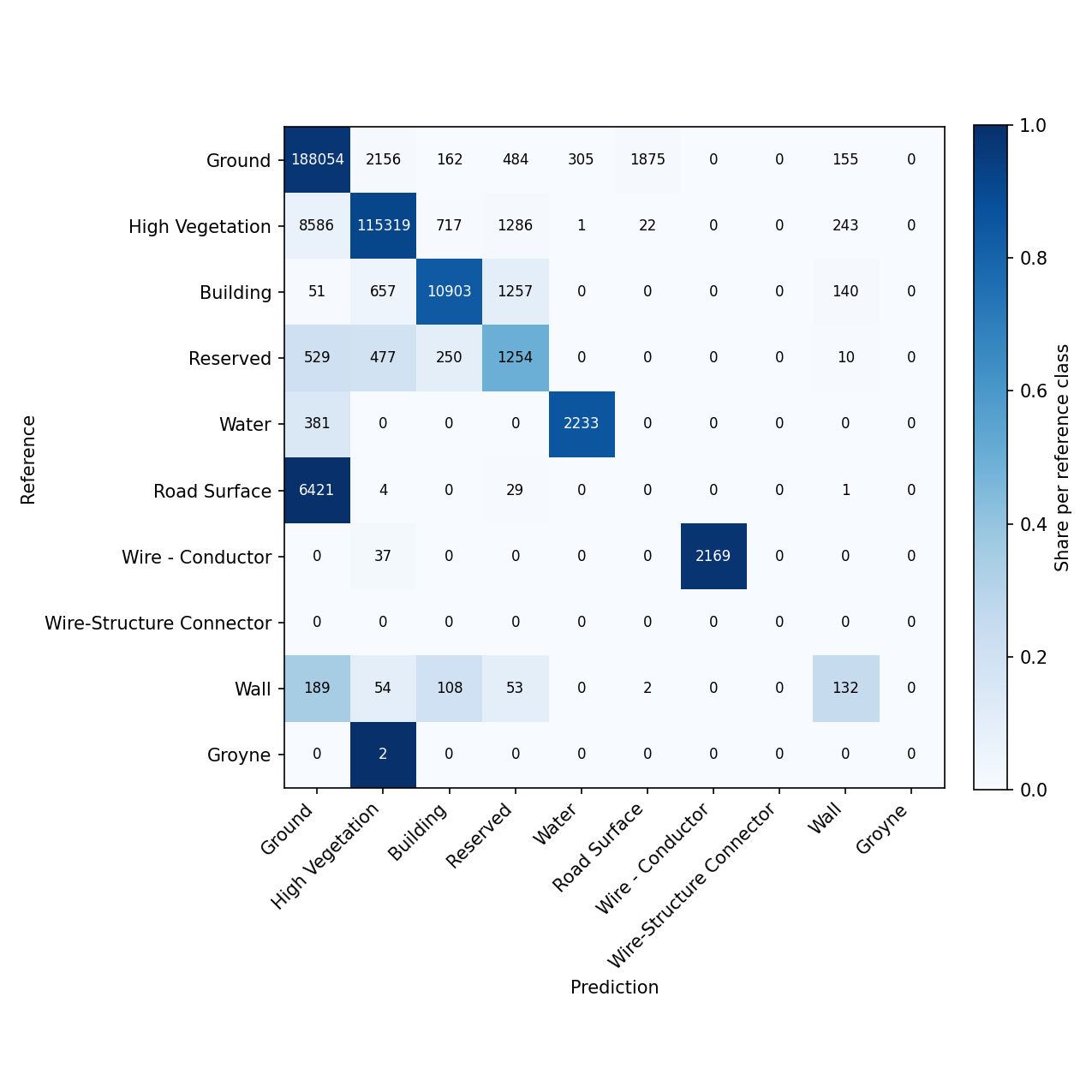
Rows represent the reference (ground-truth) classes, columns represent the predicted classes. Each cell is colored by its share of the corresponding reference row, the diagonal therefore shows how much of each reference class was correctly predicted, while off-diagonal cells reveal which classes get confused with one another. A well-performing class produces a dark diagonal cell and light off-diagonal cells in its row and column. A systematically confused class instead shows substantial number of points in one or more off-diagonal cells, indicating that the model's features do not sufficiently separate it from those classes.
This makes the confusion matrix a more informative diagnostic than the aggregate mIoU/OA/mAcc metrics alone: it identifies which classes are problematic and what they are confused with, which in turn can point to insufficient or ambiguous training features, an unbalanced split (see Split Ratio), or genuinely overlapping geometric/radiometric characteristics between the classes involved.
Training parameters (epochs, learning rate, etc.) are read from the .cfg file. A successful training run creates the run folder structure described above under runs/train/ <timestamp>/ (see General description). The config.yaml is essential for inference, it freezes the exact transforms and model architecture used during training and should not be deleted or modified.
At the end of each training, the test metrics and per-class IoU are reported. The confusion matrix exported alongside these metrics (see Confusion matrix) helps identify which classes are confused with one another, which is the recommended starting point when investigating low per-class scores.
-sweep runs a cross-product parameter study: each combination becomes its own run under runs/train/ <timestamp>_sweep/, and a sweep_summary.csv collects the results. A single axis with comma-separated values sweeps that one parameter:
This starts 3 runs, one per learning rate, under:
Multiple axes (space-separated) form the full cross-product:
This runs all 2x2=4 combinations (lr=0.01/voxel=0.25, lr=0.01/voxel=0.5, lr=0.1/voxel=0.25, lr=0.1/voxel=0.5), each as a separate run directory.
Axes that only affect the model (e.g. model.optimizer.lr) reuse the same NAG cache across all combinations. Axes that are part of the pre_transform (e.g. datamodule.voxel) change the cache hash. If a given value was not preprocessed beforehand, the datamodule preprocesses it on-the-fly the first time that combination runs. subsequent combinations with the same value reuse the resulting cache.
sweep_summary.csv reports one row per combination, including status and key metrics:
A failed combination does not abort the sweep, it is logged with status=failed and the remaining combinations continue.
A successful (non-sweep) training run creates the following directory:
The config.yaml is essential for inference. It freezes the exact transforms and model architecture used during training. Do not delete or modify it.
 1.8.17